Node.js 中的 ECMAScript 模块支持
🌐 ECMAScript Module Support in Node.js
在过去的几年里,Node.js 一直在努力支持 ECMAScript 模块(ESM)。 这是一个非常困难的功能,因为 Node.js 生态系统是建立在一种不同的模块系统——CommonJS(CJS)之上的。 在两者之间互操作带来了很大的挑战,需要处理许多新功能; 然而,Node.js 对 ESM 的支持大部分在 Node.js 12 及更高版本中实现。 在 TypeScript 4.5 左右,我们推出了仅限夜间版本对 Node.js 中 ESM 的支持,以便从用户那里获取一些反馈,并让库的作者为更广泛的支持做好准备。
🌐 For the last few years, Node.js has been working to support ECMAScript modules (ESM). This has been a very difficult feature, since the Node.js ecosystem is built on a different module system called CommonJS (CJS). Interoperating between the two brings large challenges, with many new features to juggle; however, support for ESM in Node.js was largely implemented in Node.js 12 and later. Around TypeScript 4.5 we rolled out nightly-only support for ESM in Node.js to get some feedback from users and let library authors ready themselves for broader support.
TypeScript 4.7 通过两个新的 module 设置提供了此功能:node16 和 nodenext。
🌐 TypeScript 4.7 adds this functionality with two new module settings: node16 and nodenext.
jsonc
这些新模式带来了一些高级功能,我们将在这里进行探讨。
🌐 These new modes bring a few high-level features which we’ll explore here.
package.json 中的 type 及新扩展
🌐 type in package.json and New Extensions
Node.js 支持 package.json 中的新设置,称为 type。
"type" 可以设置为 "module" 或 "commonjs"。
🌐 Node.js supports a new setting in package.json called type.
"type" can be set to either "module" or "commonjs".
jsonc
此设置用于控制是否将 .js 和 .d.ts 文件解释为 ES 模块或 CommonJS 模块,如果未设置,则默认使用 CommonJS。当文件被视为 ES 模块时,与 CommonJS 相比,会有一些不同的规则适用:
🌐 This setting controls whether .js and .d.ts files are interpreted as ES modules or CommonJS modules, and defaults to CommonJS when not set.
When a file is considered an ES module, a few different rules come into play compared to CommonJS:
import/export语句可以使用。- 顶层
await可以使用 - 相对导入路径需要完整的扩展名(我们必须写
import "./foo.js"而不是import "./foo")。 - 导入可能与
node_modules中的依赖解析方式不同。 - 某些类似全局的值,例如
require和module,不能直接使用。 - CommonJS 模块需要遵循某些特殊规则导入。
我们将回顾其中的一些功能。
🌐 We’ll come back to some of these.
为了覆盖 TypeScript 在此系统中的工作方式,.ts 和 .tsx 文件现在以相同的方式工作。当 TypeScript 发现 .ts、.tsx、.js 或 .jsx 文件时,它会向上查找 package.json 文件,以确定该文件是否为 ES 模块,并以此来判断:
🌐 To overlay the way TypeScript works in this system, .ts and .tsx files now work the same way.
When TypeScript finds a .ts, .tsx, .js, or .jsx file, it will walk up looking for a package.json to see whether that file is an ES module, and use that to determine:
- 如何查找该文件导入的其他模块
- 以及如何在生成输出时转换该文件
当一个 .ts 文件被编译为 ES 模块时,ECMAScript import/export 语句会在 .js 输出中保持不变;当它被编译为 CommonJS 模块时,它将生成你今天在 --module commonjs 下得到的相同输出。
🌐 When a .ts file is compiled as an ES module, ECMAScript import/export statements are left alone in the .js output;
when it’s compiled as a CommonJS module, it will produce the same output you get today under --module commonjs.
这也意味着 .ts 文件中 ES 模块和 CJS 模块的路径解析方式不同。例如,假设你今天有以下代码:
🌐 This also means paths resolve differently between .ts files that are ES modules and ones that are CJS modules.
For example, let’s say you have the following code today:
ts
这段代码在 CommonJS 模块中可以工作,但在 ES 模块中会失败,因为相对导入路径需要使用文件扩展名。因此,它必须被重写,以使用 foo.ts 输出的扩展名——所以 bar.ts 将不得不从 ./foo.js 中导入。
🌐 This code works in CommonJS modules, but will fail in ES modules because relative import paths need to use extensions.
As a result, it will have to be rewritten to use the extension of the output of foo.ts - so bar.ts will instead have to import from ./foo.js.
ts
乍一看,这可能感觉有点麻烦,但 TypeScript 工具(例如自动导入和路径补全)通常会为你完成这些工作。
🌐 This might feel a bit cumbersome at first, but TypeScript tooling like auto-imports and path completion will typically just do this for you.
还有一点需要提及的是,这同样适用于 .d.ts 文件。当 TypeScript 在一个包中找到 .d.ts 文件时,它会根据所含的包进行解释。
🌐 One other thing to mention is the fact that this applies to .d.ts files too.
When TypeScript finds a .d.ts file in a package, it is interpreted based on the containing package.
新的文件扩展名
🌐 New File Extensions
package.json 中的 type 字段很不错,因为它允许我们继续使用 .ts 和 .js 文件扩展名,这可能很方便;不过,有时你需要编写的文件可能与 type 指定的不同。你也可能只是总是希望明确指定。
🌐 The type field in package.json is nice because it allows us to continue using the .ts and .js file extensions which can be convenient;
however, you will occasionally need to write a file that differs from what type specifies.
You might also just prefer to always be explicit.
Node.js 支持两种扩展来帮助实现这一点:.mjs 和 .cjs。.mjs 文件始终是 ES 模块,.cjs 文件始终是 CommonJS 模块,而且无法覆盖这些设置。
🌐 Node.js supports two extensions to help with this: .mjs and .cjs.
.mjs files are always ES modules, and .cjs files are always CommonJS modules, and there’s no way to override these.
反过来,TypeScript 支持两种新的源文件扩展名:.mts 和 .cts。当 TypeScript 将它们编译为 JavaScript 文件时,它会分别将它们编译为 .mjs 和 .cjs。
🌐 In turn, TypeScript supports two new source file extensions: .mts and .cts.
When TypeScript emits these to JavaScript files, it will emit them to .mjs and .cjs respectively.
此外,TypeScript 还支持两种新的声明文件扩展名:.d.mts 和 .d.cts。当 TypeScript 为 .mts 和 .cts 生成声明文件时,它们对应的扩展名将是 .d.mts 和 .d.cts。
🌐 Furthermore, TypeScript also supports two new declaration file extensions: .d.mts and .d.cts.
When TypeScript generates declaration files for .mts and .cts, their corresponding extensions will be .d.mts and .d.cts.
使用这些扩展完全是可选的,但即使你选择不将它们用作主要工作流程的一部分,它们通常也很有用。
🌐 Using these extensions is entirely optional, but will often be useful even if you choose not to use them as part of your primary workflow.
CommonJS 互操作性
🌐 CommonJS Interoperability
Node.js 允许 ES 模块导入 CommonJS 模块,就像它们是具有默认导出的 ES 模块一样。
🌐 Node.js allows ES modules to import CommonJS modules as if they were ES modules with a default export.
ts
在某些情况下,Node.js 也会从 CommonJS 模块中合成命名导出,这可能更方便。在这些情况下,ES 模块可以使用“命名空间风格”的导入(即 import * as foo from "..."),或者命名导入(即 import { helper } from "...")。
🌐 In some cases, Node.js also synthesizes named exports from CommonJS modules, which can be more convenient.
In these cases, ES modules can use a “namespace-style” import (i.e. import * as foo from "..."), or named imports (i.e. import { helper } from "...").
ts
TypeScript 并不总是能够知道这些命名导入是否会被合成,但 TypeScript 会犯宽容的错误,并在从肯定是 CommonJS 模块的文件导入时使用一些启发式算法。
🌐 There isn’t always a way for TypeScript to know whether these named imports will be synthesized, but TypeScript will err on being permissive and use some heuristics when importing from a file that is definitely a CommonJS module.
关于互操作,TypeScript 特有的一个注释是以下语法:
🌐 One TypeScript-specific note about interop is the following syntax:
ts
在 CommonJS 模块中,这归结为一次 require() 调用,而在 ES 模块中,这会导入 createRequire 来实现相同的功能。
这会使代码在浏览器等运行时(不支持 require())上的可移植性降低,但通常对于互操作性会很有用。
反过来,你可以使用如下语法来编写上面的示例:
🌐 In a CommonJS module, this just boils down to a require() call, and in an ES module, this imports createRequire to achieve the same thing.
This will make code less portable on runtimes like the browser (which don’t support require()), but will often be useful for interoperability.
In turn, you can write the above example using this syntax as follows:
ts
最后,值得注意的是,从 CJS 模块导入 ESM 文件的唯一方法是使用动态 import() 调用。这可能会带来一些挑战,但这是当前 Node.js 中的行为。
🌐 Finally, it’s worth noting that the only way to import ESM files from a CJS module is using dynamic import() calls.
This can present challenges, but is the behavior in Node.js today.
你可以在这里了解更多关于 Node.js 中 ESM/CommonJS 互操作的信息。
🌐 You can read more about ESM/CommonJS interop in Node.js here.
package.json 的导出、导入及自引用
🌐 package.json Exports, Imports, and Self-Referencing
Node.js 支持 在 package.json 中定义入口点的新字段 "exports"。
该字段是定义 "main" 在 package.json 中的更强大替代方案,并且可以控制包中的哪些部分对用户可见。
🌐 Node.js supports a new field for defining entry points in package.json called "exports".
This field is a more powerful alternative to defining "main" in package.json, and can control what parts of your package are exposed to consumers.
这是一个 package.json,支持 CommonJS 和 ESM 的独立入口点:
🌐 Here’s a package.json that supports separate entry-points for CommonJS and ESM:
jsonc
这个功能包含很多内容,你可以在 Node.js 文档 中了解更多信息。这里我们将尝试重点介绍 TypeScript 如何支持它。
🌐 There’s a lot to this feature, which you can read more about on the Node.js documentation. Here we’ll try to focus on how TypeScript supports it.
在 TypeScript 原生的 Node 支持中,它会查找 "main" 字段,然后查找对应该入口的声明文件。
例如,如果 "main" 指向 ./lib/index.js,TypeScript 会查找名为 ./lib/index.d.ts 的文件。
包的作者可以通过指定一个名为 "types"(例如 "types": "./types/index.d.ts")的单独字段来覆盖此行为。
🌐 With TypeScript’s original Node support, it would look for a "main" field, and then look for declaration files that corresponded to that entry.
For example, if "main" pointed to ./lib/index.js, TypeScript would look for a file called ./lib/index.d.ts.
A package author could override this by specifying a separate field called "types" (e.g. "types": "./types/index.d.ts").
新的支持与导入条件类似。默认情况下,TypeScript 对导入条件应用相同的规则——如果你从 ES 模块中编写 import,它会查找 import 字段;如果从 CommonJS 模块中,它会查看 require 字段。如果找到这些字段,它会寻找相应的声明文件。如果你需要指向类型声明的不同位置,可以添加一个 "types" 导入条件。
🌐 The new support works similarly with import conditions.
By default, TypeScript overlays the same rules with import conditions - if you write an import from an ES module, it will look up the import field, and from a CommonJS module, it will look at the require field.
If it finds them, it will look for a corresponding declaration file.
If you need to point to a different location for your type declarations, you can add a "types" import condition.
jsonc
在
"exports"中,"types"条件应始终放在第一位。
需要注意的是,CommonJS 入口点和 ES 模块入口点各自都需要自己的声明文件,即使它们的内容相同。每个声明文件都会根据其文件扩展名和 "type" 字段在 package.json 中被解释为 CommonJS 模块或 ES 模块,并且检测到的模块类型必须与 Node 对应 JavaScript 文件检测到的模块类型匹配,才能确保类型检查正确。尝试使用单个 .d.ts 文件来为 ES 模块入口点和 CommonJS 入口点提供类型定义会导致 TypeScript 认为只有其中一个入口点存在,从而对包的使用者造成编译器错误。
🌐 It’s important to note that the CommonJS entrypoint and the ES module entrypoint each needs its own declaration file, even if the contents are the same between them.
Every declaration file is interpreted either as a CommonJS module or as an ES module, based on its file extension and the "type" field of the package.json, and this detected module kind must match the module kind that Node will detect for the corresponding JavaScript file for type checking to be correct.
Attempting to use a single .d.ts file to type both an ES module entrypoint and a CommonJS entrypoint will cause TypeScript to think only one of those entrypoints exists, causing compiler errors for users of the package.
TypeScript 同样以类似的方式支持 package.json 的 "imports" 字段,方法是查找相应文件的声明文件,并支持 包自我引用自己。这些功能通常不需要复杂的设置,但都是被支持的。
🌐 TypeScript also supports the "imports" field of package.json in a similar manner by looking for declaration files alongside corresponding files, and supports packages self-referencing themselves.
These features are generally not as involved to set up, but are supported.
期待你的反馈!
🌐 Your Feedback Wanted!
随着我们继续开发 TypeScript 4.7,我们预计会有更多的文档和优化投入到这一功能中。支持这些新特性一直是一个雄心勃勃的任务,这也是为什么我们希望尽早获得反馈的原因!请尝试使用它,并告诉我们它对你的使用情况如何。
🌐 As we continue working on TypeScript 4.7, we expect to see more documentation and polish go into this functionality. Supporting these new features has been an ambitious under-taking, and that’s why we’re looking for early feedback on it! Please try it out and let us know how it works for you.
欲了解更多信息,你可以在这里查看实现的 PR。
🌐 For more information, you can see the implementing PR here.
模块检测控制
🌐 Control over Module Detection
将模块引入 JavaScript 的一个问题是现有的“脚本”代码与新的模块代码之间存在歧义。模块中的 JavaScript 代码运行方式略有不同,并且具有不同的作用域规则,因此工具必须决定每个文件的运行方式。例如,Node.js 要求模块的入口点必须写在 .mjs 中,或者在附近有一个带有 "type": "module" 的 package.json。TypeScript 只要在文件中发现任何 import 或 export 语句,就会将该文件视为模块,否则会假设一个 .ts 或 .js 文件是作用于全局作用域的脚本文件。
🌐 One issue with the introduction of modules to JavaScript was the ambiguity between existing “script” code and the new module code.
JavaScript code in a module runs slightly differently, and has different scoping rules, so tools have to make decisions as to how each file runs.
For example, Node.js requires module entry-points to be written in a .mjs, or have a nearby package.json with "type": "module".
TypeScript treats a file as a module whenever it finds any import or export statement in a file, but otherwise, will assume a .ts or .js file is a script file acting on the global scope.
这与 Node.js 的行为并不完全一致,其中 package.json 可以更改文件的格式,或者 --jsx 设置 react-jsx,任何 JSX 文件都包含对 JSX 工厂的隐式导入。它也与现代的预期不符,因为大多数新的 TypeScript 代码都是以模块为前提编写的。
🌐 This doesn’t quite match up with the behavior of Node.js where the package.json can change the format of a file, or the --jsx setting react-jsx, where any JSX file contains an implicit import to a JSX factory.
It also doesn’t match modern expectations where most new TypeScript code is written with modules in mind.
这就是为什么 TypeScript 4.7 引入了一个名为 moduleDetection 的新选项。moduleDetection 可以取三个值:"auto"(默认值)、"legacy"(与 4.6 及更早版本的行为相同)以及 "force"。
🌐 That’s why TypeScript 4.7 introduces a new option called moduleDetection.
moduleDetection can take on 3 values: "auto" (the default), "legacy" (the same behavior as 4.6 and prior), and "force".
在 "auto" 模式下,TypeScript 不仅会查找 import 和 export 语句,还会检查是否
🌐 Under the mode "auto", TypeScript will not only look for import and export statements, but it will also check whether
- 在
--module nodenext/--module node16下运行时,package.json中的"type"字段被设置为"module",并且 - 在
--jsx react-jsx下运行时检查当前文件是否为 JSX 文件
在希望将每个文件都视为模块的情况下,"force" 设置确保每个非声明文件都被视为模块。无论 module、moduleResolution 和 jsx 如何配置,这一点都成立。
🌐 In cases where you want every file to be treated as a module, the "force" setting ensures that every non-declaration file is treated as a module.
This will be true regardless of how module, moduleResolution, and jsx are configured.
同时,"legacy" 选项只是回到旧的行为,只查找 import 和 export 语句来确定文件是否为模块。
🌐 Meanwhile, the "legacy" option simply goes back to the old behavior of only seeking out import and export statements to determine whether a file is a module.
🌐 You can read up more about this change on the pull request.
括号元素访问的控制流分析
🌐 Control-Flow Analysis for Bracketed Element Access
TypeScript 4.7 现在在索引键是字面量类型和唯一符号时,会缩小元素访问的类型。例如,看看以下代码:
🌐 TypeScript 4.7 now narrows the types of element accesses when the indexed keys are literal types and unique symbols. For example, take the following code:
ts
以前,TypeScript 不会考虑 obj[key] 上的任何类型保护,也不知道 obj[key] 实际上是 string。
相反,它会认为 obj[key] 仍然是 string | number,访问 toUpperCase() 会触发错误。
🌐 Previously, TypeScript would not consider any type guards on obj[key], and would have no idea that obj[key] was really a string.
Instead, it would think that obj[key] was still a string | number and accessing toUpperCase() would trigger an error.
TypeScript 4.7 现在知道 obj[key] 是一个字符串。
🌐 TypeScript 4.7 now knows that obj[key] is a string.
这也意味着在 --strictPropertyInitialization 下,TypeScript 可以正确检查计算属性在构造函数体结束时已被初始化。
🌐 This also means that under --strictPropertyInitialization, TypeScript can correctly check that computed properties are initialized by the end of a constructor body.
ts
在 TypeScript 4.7 中,--strictPropertyInitialization 报告了一个错误,告诉我们 [key] 属性在构造函数结束时候尚未被明确赋值。
🌐 Under TypeScript 4.7, --strictPropertyInitialization reports an error telling us that the [key] property wasn’t definitely assigned by the end of the constructor.
我们想对 Oleksandr Tarasiuk 提供的 这个更改 表示感谢!
🌐 We’d like to extend our gratitude to Oleksandr Tarasiuk who provided this change!
改进了对象和方法中的函数推断
🌐 Improved Function Inference in Objects and Methods
TypeScript 4.7 现在可以对对象和数组中的函数进行更细粒度的推断。这允许这些函数的类型像普通参数一样,沿从左到右的方式一致地流动。
🌐 TypeScript 4.7 can now perform more granular inferences from functions within objects and arrays. This allows the types of these functions to consistently flow in a left-to-right manner just like for plain arguments.
ts
在这些例子中,推断失败是因为知道它们的 produce 函数的类型会间接要求在为 T 找到合适类型之前先获取 arg 的类型。TypeScript 现在会收集可能对 T 的推断类型有所贡献的函数,并对它们进行惰性推断。
🌐 Inference failed in some of these examples because knowing the type of their produce functions would indirectly request the type of arg before finding a good type for T.
TypeScript now gathers functions that could contribute to the inferred type of T and infers from them lazily.
欲了解更多信息,你可以查看我们推断过程的具体修改。
🌐 For more information, you can take a look at the specific modifications to our inference process.
实例化表达式
🌐 Instantiation Expressions
有时候函数可能比我们想要的更通用。例如,假设我们有一个 makeBox 函数。
🌐 Occasionally functions can be a bit more general than we want.
For example, let’s say we had a makeBox function.
ts
也许我们希望为创建 Wrench 的 Box 和 Hammer 制作一组更专业的函数。要做到这一点,我们现在必须将 makeBox 封装在其他函数中,或者为 makeBox 的别名使用显式类型。
🌐 Maybe we want to create a more specialized set of functions for making Boxes of Wrenches and Hammers.
To do that today, we’d have to wrap makeBox in other functions, or use an explicit type for an alias of makeBox.
ts
这些方法可行,但封装对 makeBox 的调用有点浪费,且写出 makeWrenchBox 的完整签名可能会变得繁琐。理想情况下,我们希望能够表示只想给 makeBox 设置别名,同时替换其签名中的所有泛型。
🌐 These work, but wrapping a call to makeBox is a bit wasteful, and writing the full signature of makeWrenchBox could get unwieldy.
Ideally, we would be able to say that we just want to alias makeBox while replacing all of the generics in its signature.
TypeScript 4.7 正是允许这样做! 我们现在可以直接把类型参数传给函数和构造函数。
🌐 TypeScript 4.7 allows exactly that! We can now take functions and constructors and feed them type arguments directly.
ts
因此,我们可以专门化 makeBox 来接受更具体的类型,并拒绝任何其他类型。
🌐 So with this, we can specialize makeBox to accept more specific types and reject anything else.
ts
这一逻辑同样适用于构造函数,如 Array、Map 和 Set。
🌐 This logic also works for constructor functions such as Array, Map, and Set.
ts
当一个函数或构造函数提供类型参数时,它将生成一个新类型,该类型保留所有类型参数列表兼容的签名,并用给定的类型参数替换相应的类型参数。其他签名将被丢弃,因为 TypeScript 会认为它们不应该被使用。
🌐 When a function or constructor is given type arguments, it will produce a new type that keeps all signatures with compatible type parameter lists, and replaces the corresponding type parameters with the given type arguments. Any other signatures are dropped, as TypeScript will assume that they aren’t meant to be used.
有关此功能的更多信息,请查看拉取请求。
🌐 For more information on this feature, check out the pull request.
extends 对 infer 类型变量的约束
🌐 extends Constraints on infer Type Variables
条件类型是一种进阶功能。它们允许我们根据类型的结构进行匹配和推断,并基于这些进行决策。例如,我们可以写一个条件类型,如果是类似 string 的类型,它会返回元组类型的第一个元素。
🌐 Conditional types are a bit of a power-user feature.
They allow us to match and infer against the shape of types, and make decisions based on them.
For example, we can write a conditional type that returns the first element of a tuple type if it’s a string-like type.
ts
FirstIfString 匹配任何至少有一个元素的元组,并将第一个元素的类型作为 S。然后它检查 S 是否与 string 兼容,如果兼容则返回该类型。
请注意,我们不得不使用两个条件类型来编写这个。我们本可以将 FirstIfString 编写如下:
🌐 Note that we had to use two conditional types to write this.
We could have written FirstIfString as follows:
ts
这可行,但它稍微更“手动”,不那么声明式。我们不能仅仅模式匹配类型并给第一个元素命名,而是必须使用 T[0] 从 T 中取出第 0 个元素。如果我们处理的类型比元组更复杂,这可能会变得更棘手,所以 infer 可以简化事情。
🌐 This works, but it’s slightly more “manual” and less declarative.
Instead of just pattern-matching on the type and giving the first element a name, we have to fetch out the 0th element of T with T[0].
If we were dealing with types more complex than tuples, this could get a lot trickier, so infer can simplify things.
使用嵌套条件来推断类型,然后再对推断出的类型进行匹配是相当常见的。为了避免第二层嵌套,TypeScript 4.7 现在允许你对任何 infer 类型设置约束。
🌐 Using nested conditionals to infer a type and then match against that inferred type is pretty common.
To avoid that second level of nesting, TypeScript 4.7 now allows you to place a constraint on any infer type.
ts
这样,当 TypeScript 与 S 匹配时,它也会确保 S 必须是 string。如果 S 不是 string,它会走假路径,在这些情况下是 never。
🌐 This way, when TypeScript matches against S, it also ensures that S has to be a string.
If S isn’t a string, it takes the false path, which in these cases is never.
欲了解更多详情,你可以在 GitHub 上查看该更改。
🌐 For more details, you can read up on the change on GitHub.
类型参数的可选变体注解
🌐 Optional Variance Annotations for Type Parameters
让我们采用以下类型。
🌐 Let’s take the following types.
ts
想象我们有两个不同的 Getter 实例。
确定任意两个不同的 Getter 是否可以互相替换,完全取决于 T。
在判断赋值 Getter<Dog> → Getter<Animal> 是否有效的情况下,我们必须检查 Dog → Animal 是否有效。
因为每种 T 的类型都只是以相同的“方向”进行关联,所以我们称 Getter 类型在 T 上是协变的。
另一方面,检查 Setter<Dog> → Setter<Animal> 是否有效涉及检查 Animal → Dog 是否有效。
这种方向上的“翻转”,有点像在数学中,检查 -x < -y 与检查 y < x 是一样的。
当我们必须像这样翻转方向来比较 T 时,我们称 Setter 在 T 上是逆变的。
🌐 Imagine we had two different instances of Getters.
Figuring out whether any two different Getters are substitutable for one another depends entirely on T.
In the case of whether an assignment of Getter<Dog> → Getter<Animal> is valid, we have to check whether Dog → Animal is valid.
Because each type for T just gets related in the same “direction”, we say that the Getter type is covariant on T.
On the other hand, checking whether Setter<Dog> → Setter<Animal> is valid involves checking whether Animal → Dog is valid.
That “flip” in direction is kind of like how in math, checking whether −x < −y is the same as checking whether y < x.
When we have to flip directions like this to compare T, we say that Setter is contravariant on T.
在 TypeScript 4.7 中,我们现在可以明确指定类型参数的修改性。
🌐 With TypeScript 4.7, we’re now able to explicitly specify variance on type parameters.
所以现在,如果我们想明确表示 Getter 在 T 上是协变的,我们可以给它一个 out 修饰符。
🌐 So now, if we want to make it explicit that Getter is covariant on T, we can now give it an out modifier.
ts
同样地,如果我们也想明确表示 Setter 在 T 上是逆变的,我们可以给它一个 in 修饰符。
🌐 And similarly, if we also want to make it explicit that Setter is contravariant on T, we can give it an in modifier.
ts
out 和 in 在这里使用是因为类型参数的协变性取决于它是在输出还是输入中使用。
与其考虑协变性,你可以简单地考虑 T 是否在输出和输入位置使用。
也有同时使用 in 和 out 的情况。
🌐 There are also cases for using both in and out.
ts
当一个 T 同时用于输出和输入位置时,它会变得不变。
两个不同的 State<T> 不能互换,除非它们的 T 相同。
换句话说,State<Dog> 和 State<Animal> 不能相互替代。
🌐 When a T is used in both an output and input position, it becomes invariant.
Two different State<T>s can’t be interchanged unless their Ts are the same.
In other words, State<Dog> and State<Animal> aren’t substitutable for the other.
从技术上讲,在一个纯粹的结构化类型系统中,类型参数及其协变性实际上并不重要——你只需将类型代入每个类型参数的位置,然后检查每个对应的成员是否在结构上兼容。 那么,如果 TypeScript 使用的是结构化类型系统,为什么我们仍然关心类型参数的协变性呢? 我们为什么可能会想要对它们进行注解呢?
🌐 Now technically speaking, in a purely structural type system, type parameters and their variance don’t really matter - you can just plug in types in place of each type parameter and check whether each matching member is structurally compatible. So if TypeScript uses a structural type system, why are we interested in the variance of type parameters? And why might we ever want to annotate them?
其中一个原因是,读者能够一眼明了地看到类型参数是如何被使用的,这可能会非常有用。对于更复杂的类型,很难判断一个类型是应该被读取、写入,还是两者兼而有之。如果我们忘记说明类型参数是如何使用的,TypeScript 也会帮我们指出问题。举个例子,如果我们忘记在 State 上同时指定 in 和 out,就会出现错误。
🌐 One reason is that it can be useful for a reader to explicitly see how a type parameter is used at a glance.
For much more complex types, it can be difficult to tell whether a type is meant to be read, written, or both.
TypeScript will also help us out if we forget to mention how that type parameter is used.
As an example, if we forgot to specify both in and out on State, we’d get an error.
ts
另一个原因是精确度和速度! TypeScript 已经尝试将类型参数的修改性进行推断,以进行优化。 通过这样做,它可以在合理的时间内对更大的结构类型进行类型检查。 提前计算修改性允许类型检查器跳过更深层次的比较,只比较类型参数,这比反复比较类型的完整结构要快得多。 但通常也有一些情况,这种计算仍然相当昂贵,而且计算可能会发现无法准确解决的循环关系,这意味着类型的修改性没有明确的答案。
🌐 Another reason is precision and speed! TypeScript already tries to infer the variance of type parameters as an optimization. By doing this, it can type-check larger structural types in a reasonable amount of time. Calculating variance ahead of time allows the type-checker to skip deeper comparisons and just compare type arguments which can be much faster than comparing the full structure of a type over and over again. But often there are cases where this calculation is still fairly expensive, and the calculation may find circularities that can’t be accurately resolved, meaning there’s no clear answer for the variance of a type.
ts
提供明确的注解可以加快这些循环处的类型检查,并提高准确性。例如,在上述示例中将 T 标记为不变可以帮助阻止有问题的赋值。
🌐 Providing an explicit annotation can speed up type-checking at these circularities and provide better accuracy.
For instance, marking T as invariant in the above example can help stop the problematic assignment.
diff
我们并不一定建议对每个类型参数都标注其修改性; 例如,可以(尽管不推荐)将修改性设置得比实际需要的更严格,因此如果某个类型实际上只是协变、逆变,甚至独立的,TypeScript 也不会阻止你将其标记为不变。 所以,如果你选择添加显式的修改性标记,我们鼓励你谨慎且准确地使用它们。
🌐 We don’t necessarily recommend annotating every type parameter with its variance; For example, it’s possible (but not recommended) to make variance a little stricter than is necessary, so TypeScript won’t stop you from marking something as invariant if it’s really just covariant, contravariant, or even independent. So if you do choose to add explicit variance markers, we would encourage thoughtful and precise use of them.
但是,如果你正在处理深度递归类型,尤其是当你是一个库的作者时,你可能会对使用这些注解来提高用户体验感兴趣。 这些注解可以在准确性和类型检查速度上带来优势,甚至会影响他们的代码编辑体验。 可以通过实验来确定何时方差计算在类型检查时间上成为瓶颈,并使用像我们analyze-trace工具这样的工具来确定。
🌐 But if you’re working with deeply recursive types, especially if you’re a library author, you may be interested in using these annotations to the benefit of your users. Those annotations can provide wins in both accuracy and type-checking speed, which can even affect their code editing experience. Determining when variance calculation is a bottleneck on type-checking time can be done experimentally, and determined using tooling like our analyze-trace utility.
有关此功能的更多详细信息,你可以查看拉取请求。
🌐 For more details on this feature, you can read up on the pull request.
moduleSuffixes 分辨率自定义
🌐 Resolution Customization with moduleSuffixes
TypeScript 4.7 现在支持 moduleSuffixes 选项来定制模块说明符的查找方式。
🌐 TypeScript 4.7 now supports a moduleSuffixes option to customize how module specifiers are looked up.
jsonc
给定上述配置,导入如下……
🌐 Given the above configuration, an import like the following…
ts
将尝试查看相关文件 ./foo.ios.ts、./foo.native.ts,最后是 ./foo.ts。
🌐 will try to look at the relative files ./foo.ios.ts, ./foo.native.ts, and finally ./foo.ts.
此功能对于 React Native 项目非常有用,因为每个目标平台可以使用不同的 tsconfig.json 和不同的 moduleSuffixes。
🌐 This feature can be useful for React Native projects where each target platform can use a separate tsconfig.json with differing moduleSuffixes.
moduleSuffixes 选项 的贡献要感谢 Adam Foxman!
resolution-mode
在 Node 的 ECMAScript 解析中,包含文件的模式和你使用的语法决定了导入的解析方式;然而,从 ECMAScript 模块引用 CommonJS 模块的类型,或反之,则会很有用。
🌐 With Node’s ECMAScript resolution, the mode of the containing file and the syntax you use determines how imports are resolved; however it would be useful to reference the types of a CommonJS module from an ECMAScript module, or vice-versa.
TypeScript 现在允许使用 /// <reference types="..." /> 指令。
🌐 TypeScript now allows /// <reference types="..." /> directives.
ts
此外,在 TypeScript 的夜间版本中,import type 可以指定导入断言以实现类似的功能。
🌐 Additionally, in nightly versions of TypeScript, import type can specify an import assertion to achieve something similar.
ts
这些导入断言也可以用于 import() 类型。
🌐 These import assertions can also be used on import() types.
ts
import type 和 import() 语法仅在 TypeScript 夜间构建 中支持 resolution-mode。你很可能会得到如下错误
🌐 The import type and import() syntaxes only support resolution-mode in nightly builds of TypeScript.
You’ll likely get an error like
如果你确实在 TypeScript 的夜间版本中使用此功能,请考虑对此问题提供反馈。
🌐 If you do find yourself using this feature in nightly versions of TypeScript, consider providing feedback on this issue.
🌐 You can see the respective changes for reference directives and for type import assertions.
跳转到源定义
🌐 Go to Source Definition
TypeScript 4.7 支持一个新的实验性编辑器命令,称为 跳转到源定义。
它类似于 跳转到定义,但它绝不会返回声明文件中的结果。
相反,它会尝试查找对应的 实现 文件(如 .js 或 .ts 文件),并在这些文件中找到定义 —— 即使这些文件通常被 .d.ts 文件覆盖。
🌐 TypeScript 4.7 contains support for a new experimental editor command called Go To Source Definition.
It’s similar to Go To Definition, but it never returns results inside declaration files.
Instead, it tries to find corresponding implementation files (like .js or .ts files), and find definitions there — even if those files are normally shadowed by .d.ts files.
当你需要查看从库中导入的函数的实现,而不是它在 .d.ts 文件中的类型声明时,这通常非常有用。
🌐 This comes in handy most often when you need to peek at the implementation of a function you’re importing from a library instead of its type declaration in a .d.ts file.
你可以在最新版的 Visual Studio Code 中尝试这个新命令。
不过请注意,这项功能仍处于预览阶段,并且存在一些已知的限制。
在某些情况下,TypeScript 会使用启发式方法来猜测哪个 .js 文件对应给定的定义结果,因此这些结果可能不准确。
Visual Studio Code 目前也还不会显示结果是否为猜测,但这是我们正在合作改进的功能。
🌐 You can try this new command in the latest versions of Visual Studio Code.
Note, though, that this functionality is still in preview, and there are some known limitations.
In some cases TypeScript uses heuristics to guess which .js file corresponds to the given result of a definition, so these results might be inaccurate.
Visual Studio Code also doesn’t yet indicate whether a result was a guess, but it’s something we’re collaborating on.
你可以针对该功能留下反馈,了解已知的限制,或在我们的专用反馈问题处了解更多信息。
🌐 You can leave feedback about the feature, read about known limitations, or learn more at our dedicated feedback issue.
基于组感知的组织导入
🌐 Group-Aware Organize Imports
TypeScript 对 JavaScript 和 TypeScript 都有一个 整理导入 的编辑器功能。不幸的是,这个功能有时可能有点笨拙,经常会天真地对你的导入语句进行排序。
🌐 TypeScript has an Organize Imports editor feature for both JavaScript and TypeScript. Unfortunately, it could be a bit of a blunt instrument, and would often naively sort your import statements.
例如,如果你在以下文件上运行了 Organize Imports……
🌐 For instance, if you ran Organize Imports on the following file…
ts
你将得到类似以下内容的结果
🌐 You would get something like the following
ts
这……并不理想。 当然,我们的导入是按路径排序的,我们的注释和换行也得到了保留,但方式并不是我们预期的。 很多情况下,如果我们按照特定方式分组了导入,那么我们希望保持这种方式。
🌐 This is… not ideal. Sure, our imports are sorted by their paths, and our comments and newlines are preserved, but not in a way we expected. Much of the time, if we have our imports grouped in a specific way, then we want to keep them that way.
TypeScript 4.7 以分组感知的方式执行整理导入。在上面的代码上运行它,看起来更符合你的预期:
🌐 TypeScript 4.7 performs Organize Imports in a group-aware manner. Running it on the above code looks a little bit more like what you’d expect:
ts
🌐 We’d like to extend our thanks to Minh Quy who provided this feature.
对象方法代码片段补全
🌐 Object Method Snippet Completions
TypeScript 现在为对象字面量方法提供了代码片段补全。当在对象中补全成员时,TypeScript 会为方法的名称提供一个常规的补全条目,并为完整的方法定义提供一个单独的补全条目!
🌐 TypeScript now provides snippet completions for object literal methods. When completing members in an object, TypeScript will provide a typical completion entry for just the name of a method, along with a separate completion entry for the full method definition!
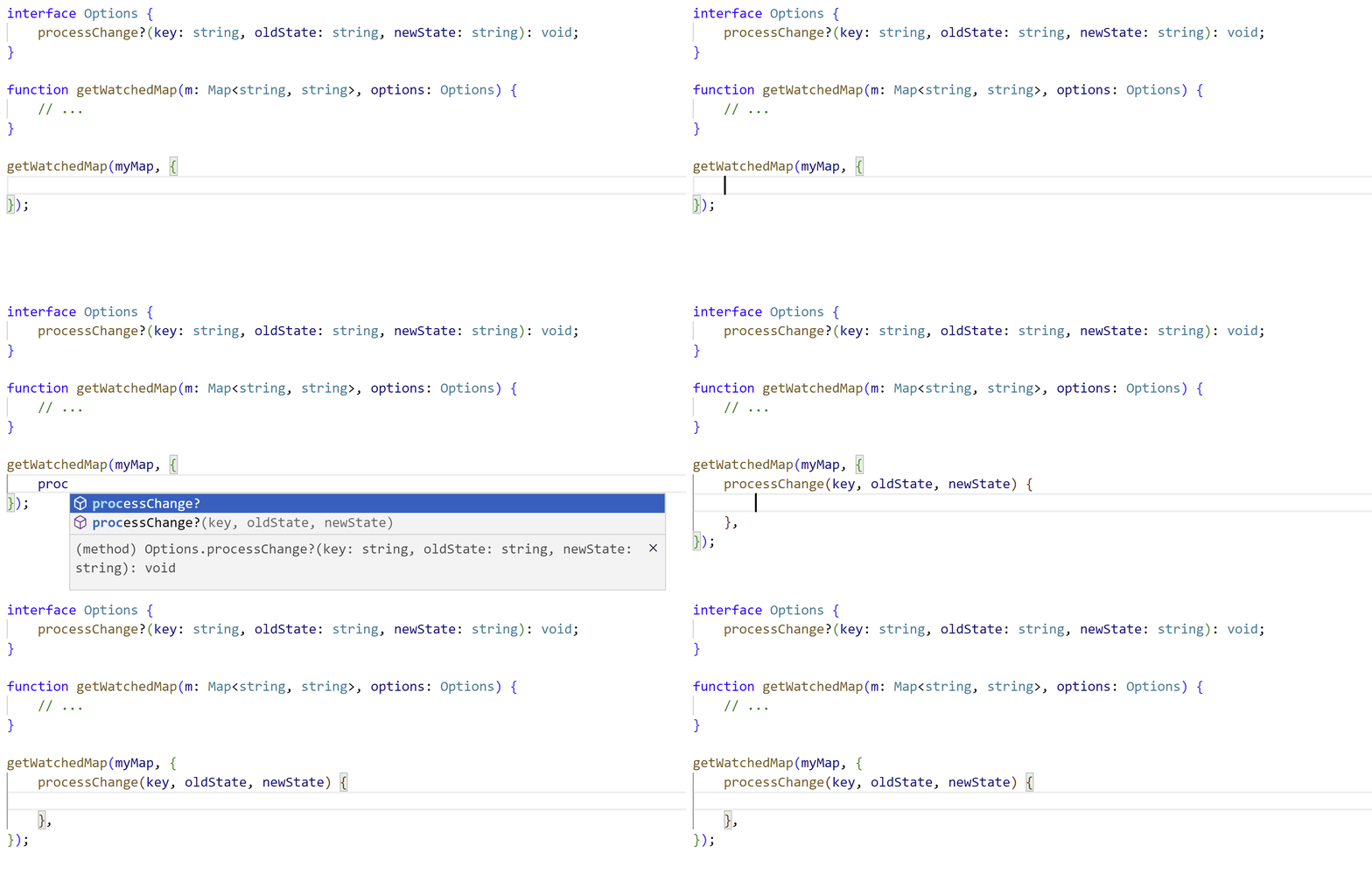
欲了解更多详情,请参阅实现该功能的拉取请求。
🌐 For more details, see the implementing pull request.
打破变更
🌐 Breaking Changes
lib.d.ts 更新
🌐 lib.d.ts Updates
虽然 TypeScript 力求避免重大破坏,但内置库的即使是很小的更改也可能引发问题。我们预计 DOM 和 lib.d.ts 更新不会导致重大破坏,但可能会有一些小问题。
🌐 While TypeScript strives to avoid major breaks, even small changes in the built-in libraries can cause issues.
We don’t expect major breaks as a result of DOM and lib.d.ts updates, but there may be some small ones.
更严格的展开检查 JSX
🌐 Stricter Spread Checks in JSX
在 JSX 中编写 ...spread 时,TypeScript 现在强制进行更严格的检查,以确保给定类型实际上是一个对象。因此,类型为 unknown 和 never 的值(以及更少见的,仅为裸 null 和 undefined)不再可以展开到 JSX 元素中。
🌐 When writing a ...spread in JSX, TypeScript now enforces stricter checks that the given type is actually an object.
As a result, values with the types unknown and never (and more rarely, just bare null and undefined) can no longer be spread into JSX elements.
对于以下示例:
🌐 So for the following example:
tsx
你现在会收到如下错误:
🌐 you’ll now receive an error like the following:
这使得此行为与对象字面量中的展开更加一致。
🌐 This makes this behavior more consistent with spreads in object literals.
欲了解更多详情,请查看 GitHub 上的更改。
🌐 For more details, see the change on GitHub.
模板字符串表达式的更严格检查
🌐 Stricter Checks with Template String Expressions
当在模板字符串中使用 symbol 值时,JavaScript 会触发运行时错误。
🌐 When a symbol value is used in a template string, it will trigger a runtime error in JavaScript.
js
因此,TypeScript 也会发出错误;然而,TypeScript 现在还会检查某些方式上被约束为符号的泛型值是否被用在模板字符串中。
🌐 As a result, TypeScript will issue an error as well; however, TypeScript now also checks if a generic value that is constrained to a symbol in some way is used in a template string.
ts
TypeScript 现在将触发以下错误:
🌐 TypeScript will now issue the following error:
在某些情况下,你可以通过将表达式封装在 String 调用中来解决,就像错误信息所建议的那样。
🌐 In some cases, you can get around this by wrapping the expression in a call to String, just like the error message suggests.
ts
在其他情况下,这个错误显得过于迂腐,你可能根本不会在使用 keyof 时允许 symbol 键。 在这种情况下,你可以切换到 string & keyof ...:
🌐 In others, this error is too pedantic, and you might not ever care to even allow symbol keys when using keyof.
In such cases, you can switch to string & keyof ...:
ts
欲了解更多信息,你可以查看实现的拉取请求。
🌐 For more information, you can see the implementing pull request.
LanguageServiceHost 上的 readFile 方法不再是可选的
🌐 readFile Method is No Longer Optional on LanguageServiceHost
如果你正在创建 LanguageService 实例,那么提供的 LanguageServiceHost 需要提供一个 readFile 方法。这个更改是为了支持新的 moduleDetection 编译器选项。
🌐 If you’re creating LanguageService instances, then provided LanguageServiceHosts will need to provide a readFile method.
This change was necessary to support the new moduleDetection compiler option.
你可以在这里阅读更多关于此变化的信息。
🌐 You can read more on the change here.
readonly 元组具有 readonly length 属性
🌐 readonly Tuples Have a readonly length Property
readonly 元组现在会将其 length 属性视为 readonly。
对于固定长度的元组,这几乎从未出现过,但这是一个疏忽,对于具有可选尾部元素和剩余元素类型的元组则可能被观察到。
🌐 A readonly tuple will now treat its length property as readonly.
This was almost never witnessable for fixed-length tuples, but was an oversight which could be observed for tuples with trailing optional and rest element types.
因此,以下代码现在将失败:
🌐 As a result, the following code will now fail:
ts
你可以在这里阅读有关此更改的更多信息。
🌐 You can read more on this change here.