别名条件和判别式的控制流分析
🌐 Control Flow Analysis of Aliased Conditions and Discriminants
在 JavaScript 中,我们经常需要以不同的方式检查一个值,并在了解其类型后采取不同的操作。TypeScript 可以理解这些检查,并将它们称为 类型保护。我们不必每次使用变量时都去说服 TypeScript 它的类型,类型检查器会利用所谓的 控制流分析 来判断我们在某段代码之前是否使用过类型保护。
🌐 In JavaScript, we often have to probe a value in different ways, and do something different once we know more about its type. TypeScript understands these checks and calls them type guards. Instead of having to convince TypeScript of a variable’s type whenever we use it, the type-checker leverages something called control flow analysis to see if we’ve used a type guard before a given piece of code.
例如,我们可以这样写:
🌐 For example, we can write something like
tsTryfunctionfoo (arg : unknown) {if (typeofarg === "string") {console .log (arg .toUpperCase ());}}
在这个例子中,我们检查了 arg 是否是 string。TypeScript 识别了 typeof arg === "string" 检查,它被认为是类型保护,并且知道在 if 代码块的内部 arg 是 string。这让我们能够访问 string 的方法,比如 toUpperCase(),而不会出现错误。
🌐 In this example, we checked whether arg was a string.
TypeScript recognized the typeof arg === "string" check, which it considered a type guard, and knew that arg was a string inside the body of the if block.
That let us access string methods like toUpperCase() without getting an error.
但是,如果我们把条件提取到一个名为 argIsString 的常量中,会发生什么呢?
🌐 However, what would happen if we moved the condition out to a constant called argIsString?
ts
在以前的 TypeScript 版本中,即使 argIsString 被赋值为类型保护,这也会是一个错误,TypeScript 只是丢失了该信息。这很不方便,因为我们可能希望在多个地方重用相同的检查。为了避免这种情况,用户通常需要重复操作或使用类型断言(也称为强制类型转换)。
🌐 In previous versions of TypeScript, this would be an error - even though argIsString was assigned the value of a type guard, TypeScript simply lost that information.
That’s unfortunate since we might want to re-use the same check in several places.
To get around that, users often have to repeat themselves or use type assertions (a.k.a. casts).
在 TypeScript 4.4 中,情况已经不再是这样。上面的例子可以正常工作,没有任何错误!当 TypeScript 看到我们在测试一个常量值时,它会额外做一些工作来检查是否包含类型保护。如果该类型保护作用于 const、readonly 属性或未修改的参数,那么 TypeScript 就能够适当地缩小该值的类型范围。
🌐 In TypeScript 4.4, that is no longer the case.
The above example works with no errors!
When TypeScript sees that we are testing a constant value, it will do a little bit of extra work to see if it contains a type guard.
If that type guard operates on a const, a readonly property, or an un-modified parameter, then TypeScript is able to narrow that value appropriately.
不同类型的类型保护条件都会被保留——不仅仅是 typeof 的检查。例如,对判别联合的检查也能完美工作。
🌐 Different sorts of type guard conditions are preserved - not just typeof checks.
For example, checks on discriminated unions work like a charm.
tsTrytypeShape =| {kind : "circle";radius : number }| {kind : "square";sideLength : number };functionarea (shape :Shape ): number {constisCircle =shape .kind === "circle";if (isCircle ) {// We know we have a circle here!returnMath .PI *shape .radius ** 2;} else {// We know we're left with a square here!returnshape .sideLength ** 2;}}
4.4 中关于判别式的分析也更深入了一些——我们现在可以提取出判别式,TypeScript 可以缩小原始对象的类型范围。
🌐 Analysis on discriminants in 4.4 also goes a little bit deeper - we can now extract out discriminants and TypeScript can narrow the original object.
tsTrytypeShape =| {kind : "circle";radius : number }| {kind : "square";sideLength : number };functionarea (shape :Shape ): number {// Extract out the 'kind' field first.const {kind } =shape ;if (kind === "circle") {// We know we have a circle here!returnMath .PI *shape .radius ** 2;} else {// We know we're left with a square here!returnshape .sideLength ** 2;}}
再例如,这是一个检查其两个输入是否有内容的函数。
🌐 As another example, here’s a function that checks whether two of its inputs have contents.
tsTryfunctiondoSomeChecks (inputA : string | undefined,inputB : string | undefined,shouldDoExtraWork : boolean) {constmustDoWork =inputA &&inputB &&shouldDoExtraWork ;if (mustDoWork ) {// We can access 'string' properties on both 'inputA' and 'inputB'!constupperA =inputA .toUpperCase ();constupperB =inputB .toUpperCase ();// ...}}
如果 mustDoWork 是 true,TypeScript 可以理解 inputA 和 inputB 都存在。这意味着我们不必使用类似 inputA! 的非空断言来让 TypeScript 确信 inputA 不是 undefined。
🌐 TypeScript can understand that both inputA and inputB are both present if mustDoWork is true.
That means we don’t have to write a non-null assertion like inputA! to convince TypeScript that inputA isn’t undefined.
这里有一个很棒的功能是这个分析可以传递进行。TypeScript 会通过常量跳转,以了解你已经执行了哪些类型的检查。
🌐 One neat feature here is that this analysis works transitively. TypeScript will hop through constants to understand what sorts of checks you’ve already performed.
tsTryfunctionf (x : string | number | boolean) {constisString = typeofx === "string";constisNumber = typeofx === "number";constisStringOrNumber =isString ||isNumber ;if (isStringOrNumber ) {x ;} else {x ;}}
请注意,有一个截止点——TypeScript 在检查这些条件时不会无限深入,但其分析对于大多数检查来说已经足够深入。
🌐 Note that there’s a cutoff - TypeScript doesn’t go arbitrarily deep when checking these conditions, but its analysis is deep enough for most checks.
此功能应能让许多直观的 JavaScript 代码在 TypeScript 中“直接运行”,而不会妨碍你的开发。更多详情,请查看 GitHub 上的实现!
🌐 This feature should make a lot of intuitive JavaScript code “just work” in TypeScript without it getting in your way. For more details, check out the implementation on GitHub!
符号和模板字符串模式索引签名
🌐 Symbol and Template String Pattern Index Signatures
TypeScript 允许我们使用 索引签名 描述每个属性都必须具有特定类型的对象。这使我们可以将这些对象用作类似字典的类型,可以使用字符串键使用方括号进行索引。
🌐 TypeScript lets us describe objects where every property has to have a certain type using index signatures. This allows us to use these objects as dictionary-like types, where we can use string keys to index into them with square brackets.
例如,我们可以编写一个带有索引签名的类型,该签名接受 string 键并映射到 boolean 值。如果我们尝试赋值为除 boolean 之外的任何值,将会报错。
🌐 For example, we can write a type with an index signature that takes string keys and maps to boolean values.
If we try to assign anything other than a boolean value, we’ll get an error.
tsTryinterfaceBooleanDictionary {[key : string]: boolean;}declare letmyDict :BooleanDictionary ;// Valid to assign boolean valuesmyDict ["foo"] = true;myDict ["bar"] = false;// Error, "oops" isn't a booleanType 'string' is not assignable to type 'boolean'.2322Type 'string' is not assignable to type 'boolean'.myDict ["baz"] = "oops";
虽然这里使用 Map 可能是更好的数据结构(具体来说是 Map<string, boolean>),但 JavaScript 对象通常更方便使用,或者正好是我们手头上可以使用的。
🌐 While a Map might be a better data structure here (specifically, a Map<string, boolean>), JavaScript objects are often more convenient to use or just happen to be what we’re given to work with.
同样,Array<T> 已经定义了一个 number 索引签名,允许我们插入/检索类型为 T 的值。
🌐 Similarly, Array<T> already defines a number index signature that lets us insert/retrieve values of type T.
ts
索引签名在表达大量实际代码时非常有用;然而,直到现在,它们一直仅限于 string 和 number 键(而 string 索引签名有一个故意的特性,它们可以接受 number 键,因为这些键无论如何都会被转换为字符串)。 这意味着 TypeScript 不允许使用 symbol 键来索引对象。 TypeScript 也无法对某个 子集 的 string 键建模索引签名——例如,一个索引签名仅描述那些名称以 data- 开头的属性。
🌐 Index signatures are very useful to express lots of code out in the wild;
however, until now they’ve been limited to string and number keys (and string index signatures have an intentional quirk where they can accept number keys since they’ll be coerced to strings anyway).
That means that TypeScript didn’t allow indexing objects with symbol keys.
TypeScript also couldn’t model an index signature of some subset of string keys - for example, an index signature which describes just properties whose names start with the text data-.
TypeScript 4.4 解决了这些限制,并允许为 symbol 和模板字符串模式使用索引签名。
🌐 TypeScript 4.4 addresses these limitations, and allows index signatures for symbols and template string patterns.
例如,TypeScript 现在允许我们声明一个类型,该类型可以以任意 symbol 作为键。
🌐 For example, TypeScript now allows us to declare a type that can be keyed on arbitrary symbols.
tsTryinterfaceColors {[sym : symbol]: number;}constred =Symbol ("red");constgreen =Symbol ("green");constblue =Symbol ("blue");letcolors :Colors = {};// Assignment of a number is allowedcolors [red ] = 255;letredVal =colors [red ];Type 'string' is not assignable to type 'number'.2322Type 'string' is not assignable to type 'number'.colors [blue ] = "da ba dee";
同样,我们可以使用模板字符串模式类型来编写索引签名。一个用途可能是将以 data- 开头的属性从 TypeScript 的额外属性检查中排除。当我们将一个对象字面量传递给具有预期类型的东西时,TypeScript 会查找在预期类型中未声明的额外属性。
🌐 Similarly, we can write an index signature with template string pattern type.
One use of this might be to exempt properties starting with data- from TypeScript’s excess property checking.
When we pass an object literal to something with an expected type, TypeScript will look for excess properties that weren’t declared in the expected type.
ts
关于索引签名的最后一点说明是,它们现在允许联合类型,只要它们是无限域原始类型的联合,具体如下:
🌐 A final note on index signatures is that they now permit union types, as long as they’re a union of infinite-domain primitive types - specifically:
stringnumbersymbol- 模板字符串模式(例如
`hello-${string}`)
如果索引签名的参数是这些类型的并集,则该索引签名将被解糖为几个不同的索引签名。
🌐 An index signature whose argument is a union of these types will de-sugar into several different index signatures.
ts
欲了解更多详情,请查看拉取请求
🌐 For more details, read up on the pull request
在捕获变量 (--useUnknownInCatchVariables) 中默认使用 unknown 类型
🌐 Defaulting to the unknown Type in Catch Variables (--useUnknownInCatchVariables)
在 JavaScript 中,任何类型的值都可以通过 throw 抛出,并在 catch 子句中捕获。由于这个原因,TypeScript 历史上将 catch 子句变量类型标注为 any,并且不允许其他类型注解:
🌐 In JavaScript, any type of value can be thrown with throw and caught in a catch clause.
Because of this, TypeScript historically typed catch clause variables as any, and would not allow any other type annotation:
ts
一旦 TypeScript 添加了 unknown 类型,就很清楚对于希望获得最高正确性和类型安全的用户来说,在 catch 子句变量中使用 unknown 比 any 更好,因为它的类型收窄效果更好,并且强制我们对任意值进行测试。最终,TypeScript 4.0 允许用户在每个 catch 子句变量上显式指定 unknown(或 any)类型注解,这样我们就可以在每种情况下选择更严格的类型;然而,对于一些人来说,在每个 catch 子句上手动指定 : unknown 是一件麻烦的事。
🌐 Once TypeScript added the unknown type, it became clear that unknown was a better choice than any in catch clause variables for users who want the highest degree of correctness and type-safety, since it narrows better and forces us to test against arbitrary values.
Eventually TypeScript 4.0 allowed users to specify an explicit type annotation of unknown (or any) on each catch clause variable so that we could opt into stricter types on a case-by-case basis;
however, for some, manually specifying : unknown on every catch clause was a chore.
这就是为什么 TypeScript 4.4 引入了一个名为 useUnknownInCatchVariables 的新标志。这个标志将 catch 子句变量的默认类型从 any 改为 unknown。
🌐 That’s why TypeScript 4.4 introduces a new flag called useUnknownInCatchVariables.
This flag changes the default type of catch clause variables from any to unknown.
tsTrytry {executeSomeThirdPartyCode ();} catch (err ) {// err: unknown// Error! Property 'message' does not exist on type 'unknown'.'err' is of type 'unknown'.18046'err' is of type 'unknown'.console .error (. err message );// Works! We can narrow 'err' from 'unknown' to 'Error'.if (err instanceofError ) {console .error (err .message );}}
此标志在 strict 系列选项下启用。这意味着如果你使用 strict 检查代码,该选项会自动开启。在 TypeScript 4.4 中,你可能会遇到如下错误
🌐 This flag is enabled under the strict family of options.
That means that if you check your code using strict, this option will automatically be turned on.
You may end up with errors in TypeScript 4.4 such as
在我们不想在 catch 子句中处理 unknown 变量的情况下,我们总是可以添加一个显式的 : any 注解,这样我们就可以选择跳过更严格的类型。
🌐 In cases where we don’t want to deal with an unknown variable in a catch clause, we can always add an explicit : any annotation so that we can opt out of stricter types.
tsTrytry {executeSomeThirdPartyCode ();} catch (err : any) {console .error (err .message ); // Works again!}
欲了解更多信息,请查看实现的拉取请求。
🌐 For more information, take a look at the implementing pull request.
精确可选属性类型(--exactOptionalPropertyTypes)
🌐 Exact Optional Property Types (--exactOptionalPropertyTypes)
在 JavaScript 中,读取对象上一个 缺失 的属性会产生值 undefined。 同时,也可能存在一个实际的属性,其值为 undefined。 JavaScript 中的很多代码往往会以相同的方式处理这些情况,因此最初 TypeScript 只是将每个可选属性解释为用户在类型中写了 undefined。 例如,
🌐 In JavaScript, reading a missing property on an object produces the value undefined.
It’s also possible to have an actual property with the value undefined.
A lot of code in JavaScript tends to treat these situations the same way, and so initially TypeScript just interpreted every optional property as if a user had written undefined in the type.
For example,
ts
被认为是等效的至
🌐 was considered equivalent to
ts
这意味着用户可以明确地用 undefined 替换 age。
🌐 What this meant is that a user could explicitly write undefined in place of age.
ts
因此,默认情况下,TypeScript 不会区分值为 undefined 的存在属性和缺失属性。
虽然这在大多数情况下都能工作,但并非所有 JavaScript 代码都做相同的假设。
诸如 Object.assign、Object.keys、对象展开({ ...obj })以及 for-in 循环等函数和操作符,会根据对象上属性是否实际存在而表现不同。
在我们的 Person 示例中,如果 age 属性在其存在与否很重要的上下文中被观察到,可能会导致运行时错误。
🌐 So by default, TypeScript doesn’t distinguish between a present property with the value undefined and a missing property.
While this works most of the time, not all code in JavaScript makes the same assumptions.
Functions and operators like Object.assign, Object.keys, object spread ({ ...obj }), and for-in loops behave differently depending on whether or not a property actually exists on an object.
In the case of our Person example, this could potentially lead to runtime errors if the age property was observed in a context where its presence was important.
在 TypeScript 4.4 中,新的标志 exactOptionalPropertyTypes 指定可选属性类型应按照书写的方式精确解释,这意味着类型中不会添加 | undefined:
🌐 In TypeScript 4.4, the new flag exactOptionalPropertyTypes specifies that optional property types should be interpreted exactly as written, meaning that | undefined is not added to the type:
tsTry// With 'exactOptionalPropertyTypes' on:constType '{ name: string; age: undefined; }' is not assignable to type 'Person' with 'exactOptionalPropertyTypes: true'. Consider adding 'undefined' to the types of the target's properties. Types of property 'age' are incompatible. Type 'undefined' is not assignable to type 'number'.2375Type '{ name: string; age: undefined; }' is not assignable to type 'Person' with 'exactOptionalPropertyTypes: true'. Consider adding 'undefined' to the types of the target's properties. Types of property 'age' are incompatible. Type 'undefined' is not assignable to type 'number'.: p Person = {name : "Daniel",age :undefined , // Error! undefined isn't a number};
这个标志不是strict 系列的一部分,如果你希望启用此行为,需要显式打开它。它还需要启用 strictNullChecks。我们一直在更新 DefinitelyTyped 和其他定义,以尽量使过渡尽可能简单,但根据你的代码结构,你可能会遇到一些摩擦。
🌐 This flag is not part of the strict family and needs to be turned on explicitly if you’d like this behavior.
It also requires strictNullChecks to be enabled as well.
We’ve been making updates to DefinitelyTyped and other definitions to try to make the transition as straightforward as possible, but you may encounter some friction with this depending on how your code is structured.
欲了解更多信息,你可以查看此处的实现拉取请求。
🌐 For more information, you can take a look at the implementing pull request here.
static 类中的代码块
🌐 static Blocks in Classes
TypeScript 4.4 引入了对 static 类块 的支持,这是即将推出的 ECMAScript 特性,可以帮助你为静态成员编写更复杂的初始化代码。
🌐 TypeScript 4.4 brings support for static blocks in classes, an upcoming ECMAScript feature that can help you write more-complex initialization code for static members.
tsTryclassFoo {staticcount = 0;// This is a static block:static {if (someCondition ()) {Foo .count ++;}}}
这些静态块允许你编写拥有自己作用域的一系列语句,这些语句可以访问包含类中的私有字段。也就是说,我们可以编写具有完整语句功能的初始化代码,变量不会泄漏,并且可以完全访问我们类的内部内容。
🌐 These static blocks allow you to write a sequence of statements with their own scope that can access private fields within the containing class. That means that we can write initialization code with all the capabilities of writing statements, no leakage of variables, and full access to our class’s internals.
tsTryclassFoo {static #count = 0;getcount () {returnFoo .#count;}static {try {constlastInstances =loadLastInstances ();Foo .#count +=lastInstances .length ;}catch {}}}
没有 static 块,虽然可以编写上面的代码,但通常需要使用几种不同类型的破解手段,并且在某种程度上需要做出妥协。
🌐 Without static blocks, writing the code above was possible, but often involved several different types of hacks that had to compromise in some way.
请注意,一个类可以有多个 static 块,并且它们会按编写的顺序依次运行。
🌐 Note that a class can have multiple static blocks, and they’re run in the same order in which they’re written.
tsTry// Prints:// 1// 2// 3classFoo {staticprop = 1static {console .log (Foo .prop ++);}static {console .log (Foo .prop ++);}static {console .log (Foo .prop ++);}}
我们想向 Wenlu Wang 表示感谢,感谢他在 TypeScript 中实现了这一功能。有关更多详情,你可以在这里查看该拉取请求。
🌐 We’d like to extend our thanks to Wenlu Wang for TypeScript’s implementation of this feature. For more details, you can see that pull request here.
tsc --help 更新与改进
🌐 tsc --help Updates and Improvements
TypeScript 的 --help 选项焕然一新!
多亏了 Song Gao 的部分工作,我们对 编译器选项的描述进行了更新,并对 --help 菜单 进行了重新设计,加入了颜色和其他视觉分隔效果。
🌐 TypeScript’s --help option has gotten a refresh!
Thanks to work in part by Song Gao, we’ve brought in changes to update the descriptions of our compiler options and restyle the --help menu with colors and other visual separation.

你可以在原提案讨论帖上阅读更多内容。
🌐 You can read more on the original proposal thread.
性能改进
🌐 Performance Improvements
更快的声明触发
🌐 Faster Declaration Emit
TypeScript 现在会缓存内部符号在不同上下文中是否可访问,以及特定类型应该如何打印。这些更改可以提升 TypeScript 在具有相当复杂类型的代码中的整体性能,特别是在使用 declaration 标志生成 .d.ts 文件时尤为明显。
🌐 TypeScript now caches whether internal symbols are accessible in different contexts, along with how specific types should be printed.
These changes can improve TypeScript’s general performance in code with fairly complex types, and is especially observed when emitting .d.ts files under the declaration flag.
更快的路径规范化
🌐 Faster Path Normalization
TypeScript 经常需要对文件路径进行几种类型的“规范化”,以使它们变成编译器可以在各处使用的一致格式。这涉及一些操作,例如将反斜杠替换为斜杠,或者删除路径中的中间 /./ 和 /../ 段。当 TypeScript 必须处理数百万个这样的路径时,这些操作会变得有些慢。在 TypeScript 4.4 中,路径首先会经过快速检查,以确定它们是否首先需要任何规范化。这些改进共同使大型项目的项目加载时间减少了 5-10%,而在我们内部测试的超大项目中,减少的幅度甚至更大。
🌐 TypeScript often has to do several types of “normalization” on file paths to get them into a consistent format that the compiler can use everywhere.
This involves things like replacing backslashes with slashes, or removing intermediate /./ and /../ segments of paths.
When TypeScript has to operate over millions of these paths, these operations end up being a bit slow.
In TypeScript 4.4, paths first undergo quick checks to see whether they need any normalization in the first place.
These improvements together reduce project load time by 5-10% on bigger projects, and significantly more in massive projects that we’ve tested internally.
欲了解更多详情,你可以查看 路径段规范化的 PR 以及 斜杠规范化的 PR。
🌐 For more details, you can view the PR for path segment normalization along with the PR for slash normalization.
更快的路径映射
🌐 Faster Path Mapping
TypeScript 现在会缓存其构建路径映射的方式(在 tsconfig.json 中使用 paths 选项)。对于拥有数百个映射的项目,这种优化可以显著减少负担。你可以在关于此更改的详细信息中查看更多内容。
🌐 TypeScript now caches the way it constructs path-mappings (using the paths option in tsconfig.json).
For projects with several hundred mappings, the reduction is significant.
You can see more on the change itself.
使用 --strict 实现更快的增量构建
🌐 Faster Incremental Builds with --strict
在实际上是一个错误的情况下,如果开启了 strict,TypeScript 在 incremental 编译下会重新进行类型检查工作。这导致许多构建速度与关闭 incremental 时一样慢。TypeScript 4.4 修复了这个问题,不过这一更改也已经回溯到 TypeScript 4.3。
🌐 In what was effectively a bug, TypeScript would end up redoing type-checking work under incremental compilations if strict was on.
This led to many builds being just as slow as if incremental was turned off.
TypeScript 4.4 fixes this, though the change has also been back-ported to TypeScript 4.3.
查看更多 这里。
🌐 See more here.
为大型输出更快地生成源码图
🌐 Faster Source Map Generation for Big Outputs
TypeScript 4.4 对非常大的输出文件的源映射生成进行了优化。在构建早期版本的 TypeScript 编译器时,这使得触发时间减少了大约 8%。
🌐 TypeScript 4.4 adds an optimization for source map generation on extremely large output files. When building an older version of the TypeScript compiler, this results in around an 8% reduction in emit time.
我们要感谢 David Michon 提供了一个 简单而干净的修改,使这一性能提升成为可能。
🌐 We’d like to extend our thanks to David Michon who provided a simple and clean change to enable this performance win.
更快的 --force 构建
🌐 Faster --force Builds
在使用项目引用的 --build 模式时,TypeScript 必须执行最新状态检查以确定需要重新构建的文件。
然而,在执行 --force 构建时,这些信息则无关紧要,因为每个项目依赖都会从头开始重建。
在 TypeScript 4.4 中,--force 构建避免了这些不必要的步骤,并开始完整构建。
有关此更改的更多信息,请参见 这里。
🌐 When using --build mode on project references, TypeScript has to perform up-to-date checks to determine which files need to be rebuilt.
When performing a --force build, however, that information is irrelevant since every project dependency will be rebuilt from scratch.
In TypeScript 4.4, --force builds avoid those unnecessary steps and start a full build.
See more about the change here.
JavaScript 拼写建议
🌐 Spelling Suggestions for JavaScript
TypeScript 为像 Visual Studio 和 Visual Studio Code 这样的编辑器提供 JavaScript 编辑体验。大多数时候,TypeScript 尝试在 JavaScript 文件中保持低调;然而,TypeScript 通常拥有大量信息来提供可靠的建议,并且提供建议的方式不会过于干扰。
🌐 TypeScript powers the JavaScript editing experience in editors like Visual Studio and Visual Studio Code. Most of the time, TypeScript tries to stay out of the way in JavaScript files; however, TypeScript often has a lot of information to make confident suggestions, and ways of surfacing suggestions that aren’t too invasive.
这就是为什么 TypeScript 现在会在普通 JavaScript 文件中提供拼写建议——即那些没有 // @ts-check 或在项目中关闭了 checkJs 的文件。这些建议与 TypeScript 文件中已有的“你是想说……吗?”建议相同,现在它们以某种形式在所有 JavaScript 文件中都可用。
🌐 That’s why TypeScript now issues spelling suggestions in plain JavaScript files - ones without // @ts-check or in a project with checkJs turned off.
These are the same “Did you mean…?” suggestions that TypeScript files already have, and now they’re available in all JavaScript files in some form.
这些拼写建议可以微妙地提示你的代码有错误。我们在测试这个功能时,成功发现了现有代码中的几个漏洞!
🌐 These spelling suggestions can provide a subtle clue that your code is wrong. We managed to find a few bugs in existing code while testing this feature!
有关此新功能的更多详情,请查看拉取请求!
🌐 For more details on this new feature, take a look at the pull request!
嵌入提示
🌐 Inlay Hints
TypeScript 4.4 提供了对 内联提示 的支持,这可以帮助在代码中显示有用的信息,如参数名称和返回类型。你可以把它看作是一种友好的“虚拟文本”。
🌐 TypeScript 4.4 provides support for inlay hints which can help display useful information like parameter names and return types in your code. You can think of it as a sort of friendly “ghost text”.

此功能由 Wenlu Wang 开发,详细信息可见他的 拉取请求。
🌐 This feature was built by Wenlu Wang whose pull request has more details.
Wenlu 还贡献了 Visual Studio Code 内嵌提示的集成,该功能已作为 2021 年 7 月(1.59)版本 的一部分发布。 如果你想尝试内嵌提示,请确保你使用的是最新的 稳定版 或 内部测试版 编辑器。 你也可以在 Visual Studio Code 的设置中修改内嵌提示的显示时间和位置。
🌐 Wenlu also contributed the integration for inlay hints in Visual Studio Code which has shipped as part of the July 2021 (1.59) release. If you’d like to try inlay hints out, make sure you’re using a recent stable or insiders version of the editor. You can also modify when and where inlay hints get displayed in Visual Studio Code’s settings.
自动导入在完成列表中显示真实路径
🌐 Auto-Imports Show True Paths in Completion Lists
当像 Visual Studio Code 这样的编辑器显示补全列表时,包含自动导入的补全会显示对应模块的路径;然而,这个路径通常并不是 TypeScript 最终会放在模块标识符中的路径。这个路径通常是相对于工作区(workspace)的,这意味着如果你从像 moment 这样的包导入,你通常会看到类似 node_modules/moment 的路径。
🌐 When editors like Visual Studio Code show a completion list, completions which include auto-imports are displayed with a path to the given module;
however, this path usually isn’t what TypeScript ends up placing in a module specifier.
The path is usually something relative to the workspace, meaning that if you’re importing from a package like moment, you’ll often see a path like node_modules/moment.
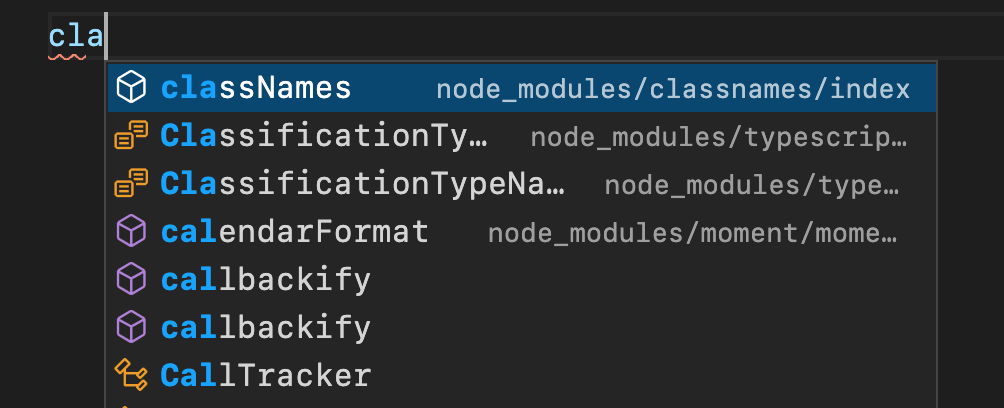
这些路径最终会变得笨重且经常具有误导性,特别是考虑到实际插入到你的文件中的路径需要考虑 Node 的 node_modules 解析、路径映射、符号链接和重新导出。
🌐 These paths end up being unwieldy and often misleading, especially given that the path that actually gets inserted into your file needs to consider Node’s node_modules resolution, path mappings, symlinks, and re-exports.
这就是为什么在 TypeScript 4.4 中,补全项的标签现在会显示实际将用于导入的模块路径!
🌐 That’s why with TypeScript 4.4, the completion item label now shows the actual module path that will be used for the import!
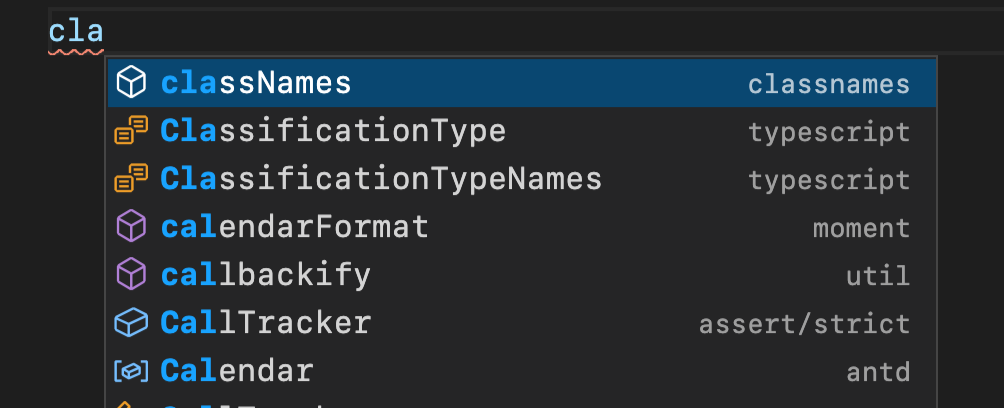
由于此计算可能比较耗费资源,包含许多自动导入的补全列表可能会在你输入更多字符时批量填充最终的模块标识符。你仍然有可能偶尔看到旧的工作区相对路径标签;然而,随着你的编辑体验“逐渐熟悉”,它们应在再按一两个键之后被实际路径替换。
🌐 Since this calculation can be expensive, completion lists containing many auto-imports may fill in the final module specifiers in batches as you type more characters. It’s possible that you’ll still sometimes see the old workspace-relative path labels; however, as your editing experience “warms up”, they should get replaced with the actual path after another keystroke or two.
打破变更
🌐 Breaking Changes
lib.d.ts 对 TypeScript 4.4 的更改
🌐 lib.d.ts Changes for TypeScript 4.4
像每个 TypeScript 版本一样,lib.d.ts 的声明(特别是为网页环境生成的声明)已经发生了变化。你可以参考我们已知的 lib.dom.d.ts 变更列表来了解受影响的内容。
🌐 As with every TypeScript version, declarations for lib.d.ts (especially the declarations generated for web contexts), have changed.
You can consult our list of known lib.dom.d.ts changes to understand what is impacted.
导入函数的间接调用更合规
🌐 More-Compliant Indirect Calls for Imported Functions
在早期版本的 TypeScript 中,从 CommonJS、AMD 以及其他非 ES 模块系统调用导入会将被调用函数的 this 值设置为某个值。
具体来说,在以下示例中,当调用 fooModule.foo() 时,foo() 方法的 this 的值会被设置为 fooModule。
🌐 In earlier versions of TypeScript, calling an import from CommonJS, AMD, and other non-ES module systems would set the this value of the called function.
Specifically, in the following example, when calling fooModule.foo(), the foo() method will have fooModule set as the value of this.
ts
当我们调用它们时,这并不是 ECMAScript 中导出函数应有的工作方式。这就是为什么 TypeScript 4.4 在调用导入函数时会故意丢弃 this 值,使用以下输出方式来实现。
🌐 This is not the way exported functions in ECMAScript are supposed to work when we call them.
That’s why TypeScript 4.4 intentionally discards the this value when calling imported functions, by using the following emit.
ts
你可以在这里了解更多关于这些变化的信息。
🌐 You can read up more about the changes here.
在捕获变量中使用 unknown
🌐 Using unknown in Catch Variables
使用 strict 标志运行的用户可能会看到与 catch 变量为 unknown 相关的新错误,尤其是在现有代码假设只有 Error 值会被捕获的情况下。这通常会导致如下错误信息:
🌐 Users running with the strict flag may see new errors around catch variables being unknown, especially if the existing code assumes only Error values have been caught.
This often results in error messages such as:
为了解决这个问题,你可以专门添加运行时检查,以确保抛出的类型与你预期的类型匹配。否则,你可以直接使用类型断言,在捕获变量中添加显式的 : any,或者关闭 useUnknownInCatchVariables。
🌐 To get around this, you can specifically add runtime checks to ensure that the thrown type matches your expected type.
Otherwise, you can just use a type assertion, add an explicit : any to your catch variable, or turn off useUnknownInCatchVariables.
更广泛的 Always-Truthy Promise 检查
🌐 Broader Always-Truthy Promise Checks
在之前的版本中,TypeScript 引入了“始终为真 Promise 检查”,用于捕捉可能忘记了 await 的代码;然而,这些检查仅适用于具名声明。这意味着虽然这段代码会正确收到错误…
🌐 In prior versions, TypeScript introduced “Always Truthy Promise checks” to catch code where an await may have been forgotten;
however, the checks only applied to named declarations.
That meant that while this code would correctly receive an error…
ts
……以下代码不会。
ts
TypeScript 4.4 现在会标记两者。有关更多信息,请阅读原始更改。
🌐 TypeScript 4.4 now flags both. For more information, read up on the original change.
抽象属性不允许初始化函数
🌐 Abstract Properties Do Not Allow Initializers
以下代码现在会出错,因为抽象属性可能没有初始化器:
🌐 The following code is now an error because abstract properties may not have initializers:
ts
相反,你只能为属性指定一个类型:
🌐 Instead, you may only specify a type for the property:
ts