类型参数作为约束
🌐 Type parameters as constraints
在 TypeScript 1.8 中,类型参数约束可以引用来自同一类型参数列表的类型参数。以前这是一个错误。这种能力通常被称为F-有界多态。
🌐 With TypeScript 1.8 it becomes possible for a type parameter constraint to reference type parameters from the same type parameter list. Previously this was an error. This capability is usually referred to as F-Bounded Polymorphism.
示例
🌐 Example
ts
控制流分析错误
🌐 Control flow analysis errors
TypeScript 1.8 引入了控制流分析,以帮助捕捉用户容易遇到的常见错误。继续阅读以获取更多详细信息,并查看这些错误的实际示例:
🌐 TypeScript 1.8 introduces control flow analysis to help catch common errors that users tend to run into. Read on to get more details, and check out these errors in action:

无法访问的代码
🌐 Unreachable code
现在,保证在运行时不会执行的语句已被正确标记为不可达代码错误。例如,紧跟在无条件 return、throw、break 或 continue 语句之后的语句被视为不可达。使用 allowUnreachableCode 可以禁用不可达代码的检测和报告。
🌐 Statements guaranteed to not be executed at run time are now correctly flagged as unreachable code errors.
For instance, statements following unconditional return, throw, break or continue statements are considered unreachable.
Use allowUnreachableCode to disable unreachable code detection and reporting.
示例
🌐 Example
以下是一个简单的代码无法访问错误示例:
🌐 Here’s a simple example of an unreachable code error:
ts
这个功能更常捕捉到的错误是在 return 语句之后添加换行符:
🌐 A more common error that this feature catches is adding a newline after a return statement:
ts
由于 JavaScript 会在行末自动终止 return 语句,因此对象字面量会变成一个代码块。
🌐 Since JavaScript automatically terminates the return statement at the end of the line, the object literal becomes a block.
未使用的标签
🌐 Unused labels
未使用的标签也会被标记。就像不可达代码检查一样,这些默认是开启的;使用 allowUnusedLabels 可以停止报告这些错误。
🌐 Unused labels are also flagged.
Just like unreachable code checks, these are turned on by default;
use allowUnusedLabels to stop reporting these errors.
示例
🌐 Example
ts
隐式返回
🌐 Implicit returns
在 JS 中,代码路径没有返回值的函数会隐式返回 undefined。 现在编译器可以将其标记为隐式返回。 默认情况下,该检查是关闭的;使用 noImplicitReturns 可以将其开启。
🌐 Functions with code paths that do not return a value in JS implicitly return undefined.
These can now be flagged by the compiler as implicit returns.
The check is turned off by default; use noImplicitReturns to turn it on.
示例
🌐 Example
ts
Case 子句的 fall-through 问题
🌐 Case clause fall-throughs
TypeScript 可以在 switch 语句中对 case 子句非空的贯穿情况报告错误。该检查默认是关闭的,可以使用 noFallthroughCasesInSwitch 启用。
🌐 TypeScript can reports errors for fall-through cases in switch statement where the case clause is non-empty.
This check is turned off by default, and can be enabled using noFallthroughCasesInSwitch.
示例
🌐 Example
使用 noFallthroughCasesInSwitch,此示例将触发错误:
🌐 With noFallthroughCasesInSwitch, this example will trigger an error:
ts
但是,在下面的例子中,由于 fall-through case 为空,因此不会报告任何错误:
🌐 However, in the following example, no error will be reported because the fall-through case is empty:
ts
React 中的函数组件
🌐 Function Components in React
TypeScript 现在支持 函数组件。这些是轻量级组件,可以轻松组合其他组件:
🌐 TypeScript now supports Function components. These are lightweight components that easily compose other components:
ts
对于此功能和简化的属性,请确保使用 最新版本的 react.d.ts。
🌐 For this feature and simplified props, be sure to use the latest version of react.d.ts.
在 React 中简化 props 类型管理
🌐 Simplified props type management in React
在 TypeScript 1.8 以及最新版的 react.d.ts(见上文)中,我们也大大简化了 props 类型的声明。
🌐 In TypeScript 1.8 with the latest version of react.d.ts (see above), we’ve also greatly simplified the declaration of props types.
具体来说:
🌐 Specifically:
- 你不再需要显式声明
ref和key或extend React.Props ref和key属性将在所有组件上以正确的类型显示ref属性在无状态函数组件的实例上被正确禁止
从模块扩展全局/模块作用域
🌐 Augmenting global/module scope from modules
用户现在可以声明他们想要对现有模块进行的任何增强,或者其他用户已经对其进行的增强。模块增强看起来就像普通的环境模块声明(即 declare module "foo" { } 语法),并且可以直接嵌套在你自己的模块中,或另一个顶层环境外部模块中。
🌐 Users can now declare any augmentations that they want to make, or that any other consumers already have made, to an existing module.
Module augmentations look like plain old ambient module declarations (i.e. the declare module "foo" { } syntax), and are directly nested either your own modules, or in another top level ambient external module.
此外,TypeScript 还具有形式为 declare global { } 的 全局 增强的概念。这允许模块在必要时增强全局类型,如 Array。
🌐 Furthermore, TypeScript also has the notion of global augmentations of the form declare global { }.
This allows modules to augment global types such as Array if necessary.
模块增强的名称是使用与 import 和 export 声明中的模块说明符相同的规则来解析的。模块增强中的声明会与任何现有声明合并,就像它们在同一个文件中声明一样合并。
🌐 The name of a module augmentation is resolved using the same set of rules as module specifiers in import and export declarations.
The declarations in a module augmentation are merged with any existing declarations the same way they would if they were declared in the same file.
模块增强和全局增强都无法向顶层作用域添加新项——它们只能“修补”现有声明。
🌐 Neither module augmentations nor global augmentations can add new items to the top level scope - they can only “patch” existing declarations.
示例
🌐 Example
这里 map.ts 可以声明它将内部修补来自 observable.ts 的 Observable 类型,并向其添加 map 方法。
🌐 Here map.ts can declare that it will internally patch the Observable type from observable.ts and add the map method to it.
ts
ts
ts
同样,可以使用 declare global 声明从模块中扩展全局作用域:
🌐 Similarly, the global scope can be augmented from modules using a declare global declarations:
示例
🌐 Example
ts
字符串字面量类型
🌐 String literal types
API期望某些值具有特定字符串的情况并不罕见。例如,考虑一个可以在屏幕上移动元素的UI库,同时控制动画的“缓动”效果。
🌐 It’s not uncommon for an API to expect a specific set of strings for certain values. For instance, consider a UI library that can move elements across the screen while controlling the “easing” of the animation.
ts
然而,这很容易出错——没有什么能阻止用户不小心拼错一个有效的缓动值:
🌐 However, this is error prone - there is nothing stopping a user from accidentally misspelling one of the valid easing values:
ts
在 TypeScript 1.8 中,我们引入了字符串字面量类型。这些类型的写法和字符串字面量相同,但用于类型的位置。
🌐 With TypeScript 1.8, we’ve introduced string literal types. These types are written the same way string literals are, but in type positions.
用户现在可以确保类型系统会捕捉到此类错误。以下是我们使用字符串字面量类型的新 AnimationOptions:
🌐 Users can now ensure that the type system will catch such errors.
Here’s our new AnimationOptions using string literal types:
ts
改进了并集/交叉类型推断
🌐 Improved union/intersection type inference
TypeScript 1.8 改进了涉及源类型和目标类型都是联合类型或交叉类型的类型推断。例如,在从 string | string[] 推断到 string | T 时,我们将类型简化为 string[] 和 T,从而为 T 推断出 string[]。
🌐 TypeScript 1.8 improves type inference involving source and target sides that are both union or intersection types.
For example, when inferring from string | string[] to string | T, we reduce the types to string[] and T, thus inferring string[] for T.
示例
🌐 Example
ts
将 AMD 和 System 模块与 --outFile 拼接
🌐 Concatenate AMD and System modules with --outFile
在 --module amd 或 --module system 的情况下指定 outFile 会将编译中的所有模块连接成一个包含多个模块闭包的单一输出文件。
🌐 Specifying outFile in conjunction with --module amd or --module system will concatenate all modules in the compilation into a single output file containing multiple module closures.
每个模块的模块名称将根据其与 rootDir 的相对位置计算得出。
🌐 A module name will be computed for each module based on its relative location to rootDir.
示例
🌐 Example
ts
ts
结果:
🌐 Results in:
js
支持 default 与 SystemJS 的导入互操作
🌐 Support for default import interop with SystemJS
像 SystemJS 这样的模块加载器会将 CommonJS 模块封装起来,并将其作为 default ES6 导入暴露出来。这使得无法在 SystemJS 和 CommonJS 实现之间共享定义文件,因为根据加载器的不同,模块的形状看起来也不同。
🌐 Module loaders like SystemJS wrap CommonJS modules and expose them as a default ES6 import. This makes it impossible to share the definition files between the SystemJS and CommonJS implementation of the module as the module shape looks different based on the loader.
设置新的编译器标志 allowSyntheticDefaultImports 表示模块加载器会执行某种合成默认导入成员创建,这在导入的 .ts 或 .d.ts 中没有体现。编译器将推断存在一个 default 导出,其形态与整个模块本身相同。
🌐 Setting the new compiler flag allowSyntheticDefaultImports indicates that the module loader performs some kind of synthetic default import member creation not indicated in the imported .ts or .d.ts. The compiler will infer the existence of a default export that has the shape of the entire module itself.
系统模块默认启用此标志。
🌐 System modules have this flag on by default.
允许在循环中捕获 let/const
🌐 Allow captured let/const in loops
以前会报错,现在在 TypeScript 1.8 中已支持。let/const 在循环中的声明并被函数捕获,现在会正确生成,以匹配 let/const 的新鲜语义。
🌐 Previously an error, now supported in TypeScript 1.8.
let/const declarations within loops and captured in functions are now emitted to correctly match let/const freshness semantics.
示例
🌐 Example
ts
编译为:
🌐 is compiled to:
js
结果为:
🌐 And results in
cmd
改进了对 for..in 语句的检查
🌐 Improved checking for for..in statements
以前,for..in 变量的类型会被推断为 any;这允许编译器忽略 for..in 体内的无效使用。
🌐 Previously the type of a for..in variable is inferred to any; that allowed the compiler to ignore invalid uses within the for..in body.
从 TypeScript 1.8 开始:
🌐 Starting with TypeScript 1.8:
- 在
for..in语句中声明的变量类型隐式为string。 - 当一个具有类型为
T的数字索引签名的对象(例如数组)被包含在for..in语句中的for..in变量索引用于具有数字索引签名且没有字符串索引签名的对象(同样例如数组)时,产生的值的类型是T。
示例
🌐 Example
ts
模块现在会带有 "use strict"; 前导部分发出
🌐 Modules are now emitted with a "use strict"; prologue
根据 ES6,模块始终以严格模式解析,但对于非 ES6 目标,生成的代码中并未遵循这一点。从 TypeScript 1.8 开始,生成的模块始终使用严格模式。在大多数代码中,这不应该带来任何可见的变化,因为 TS 将大多数严格模式错误视为编译时错误,但这意味着一些以前在运行时会悄无声息失败的操作,例如给 NaN 赋值,现在将会明显报错。你可以参考 MDN 文章 来查看严格模式和非严格模式之间的详细差异列表。
🌐 Modules were always parsed in strict mode as per ES6, but for non-ES6 targets this was not respected in the generated code. Starting with TypeScript 1.8, emitted modules are always in strict mode. This shouldn’t have any visible changes in most code as TS considers most strict mode errors as errors at compile time, but it means that some things which used to silently fail at runtime in your TS code, like assigning to NaN, will now loudly fail. You can reference the MDN Article on strict mode for a detailed list of the differences between strict mode and non-strict mode.
包括带有 --allowJs 的 .js 文件
🌐 Including .js files with --allowJs
在你的项目中,通常会有一些外部源文件,它们可能不是用 TypeScript 编写的。或者,你可能正处于将 JS 代码库转换为 TS 的过程中,但仍然希望将所有 JS 代码与新 TS 代码的输出打包到一个文件中。
🌐 Often there are external source files in your project that may not be authored in TypeScript. Alternatively, you might be in the middle of converting a JS code base into TS, but still want to bundle all your JS code into a single file with the output of your new TS code.
.js 文件现在可以作为 tsc 的输入。TypeScript 编译器会检查输入的 .js 文件是否有语法错误,并根据 target 和 module 标志生成有效输出。生成的输出也可以与其他 .ts 文件合并使用。对于 .js 文件,仍会像处理 .ts 文件一样生成源映射。
使用 --reactNamespace 的自定义 JSX 工厂
🌐 Custom JSX factories using --reactNamespace
传递 --reactNamespace <JSX factory Name> 和 --jsx react 可以使用不同于默认 React 的 JSX 工厂。
🌐 Passing --reactNamespace <JSX factory Name> along with --jsx react allows for using a different JSX factory from the default React.
新工厂名称将用于调用 createElement 和 __spread 函数。
🌐 The new factory name will be used to call createElement and __spread functions.
示例
🌐 Example
ts
编译环境:
🌐 Compiled with:
shell
结果:
🌐 Results in:
js
this 基于类型的保护
🌐 this-based type guards
TypeScript 1.8 将 用户定义的类型保护函数 扩展到类和接口的方法中。
🌐 TypeScript 1.8 extends user-defined type guard functions to class and interface methods.
this is T 现在可以作为类和接口中方法的有效返回类型注解。 当用于类型缩小的位置时(例如 if 语句),调用表达式的目标对象的类型将被缩小为 T。
示例
🌐 Example
ts
官方 TypeScript NuGet 包
🌐 Official TypeScript NuGet package
从 TypeScript 1.8 开始,TypeScript 编译器(tsc.exe)以及 MSBuild 集成(Microsoft.TypeScript.targets 和 Microsoft.TypeScript.Tasks.dll)都有官方 NuGet 包可用。
🌐 Starting with TypeScript 1.8, official NuGet packages are available for the TypeScript Compiler (tsc.exe) as well as the MSBuild integration (Microsoft.TypeScript.targets and Microsoft.TypeScript.Tasks.dll).
稳定的软件包可在此处获取:
🌐 Stable packages are available here:
此外,还可以在 myget 上获取与 夜间 npm 包 相对应的每晚 NuGet 包:
🌐 Also, a nightly NuGet package to match the nightly npm package is available on myget:
tsc 的更美观的错误信息
🌐 Prettier error messages from tsc
我们理解,大量的单色输出可能会让眼睛感到有些吃力。颜色可以帮助区分消息的开始和结束,而当错误输出过多时,这些视觉线索尤为重要。
🌐 We understand that a ton of monochrome output can be a little difficult on the eyes. Colors can help discern where a message starts and ends, and these visual clues are important when error output gets overwhelming.
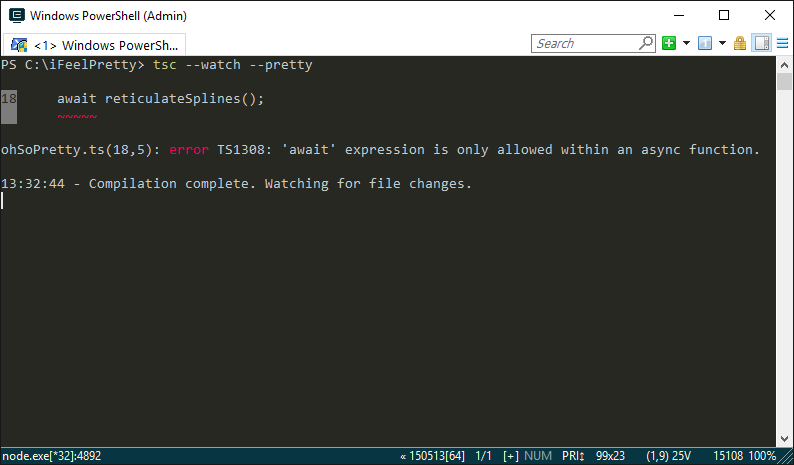
只需传递 pretty 命令行选项,TypeScript 就会提供更丰富多彩的输出,并显示问题出在哪里的上下文信息。
🌐 By just passing the pretty command line option, TypeScript gives a more colorful output with context about where things are going wrong.
VS 2015 中 JSX 代码的着色
🌐 Colorization of JSX code in VS 2015
在 TypeScript 1.8 中,JSX 标签现在可以在 Visual Studio 2015 中分类并显示颜色。
🌐 With TypeScript 1.8, JSX tags are now classified and colorized in Visual Studio 2015.

可以通过 Tools->Options->Environment->Fonts and Colors 页面更改 VB XML 的颜色和字体设置,进一步自定义分类。
🌐 The classification can be further customized by changing the font and color settings for the VB XML color and font settings through Tools->Options->Environment->Fonts and Colors page.
--project (-p) 标志现在可以接受任何文件路径
🌐 The --project (-p) flag can now take any file path
--project 命令行选项最初只能接受包含 tsconfig.json 的文件夹路径。
鉴于构建配置的不同场景,现在允许 --project 指向任何其他兼容的 JSON 文件是合理的。
例如,用户可能希望针对 Node 5 使用带有 CommonJS 模块的 ES2015,但针对浏览器使用带有 AMD 模块的 ES5。
通过这项新功能,用户可以仅使用 tsc 轻松管理两个独立的构建目标,而无需像将 tsconfig.json 文件放在不同目录中那样进行麻烦的变通处理。
🌐 The --project command line option originally could only take paths to a folder containing a tsconfig.json.
Given the different scenarios for build configurations, it made sense to allow --project to point to any other compatible JSON file.
For instance, a user might want to target ES2015 with CommonJS modules for Node 5, but ES5 with AMD modules for the browser.
With this new work, users can easily manage two separate build targets using tsc alone without having to perform hacky workarounds like placing tsconfig.json files in separate directories.
如果提供一个目录,旧的行为仍然保持不变——编译器会尝试在该目录中找到一个名为 tsconfig.json 的文件。
🌐 The old behavior still remains the same if given a directory - the compiler will try to find a file in the directory named tsconfig.json.
允许在 tsconfig.json 中添加注释
🌐 Allow comments in tsconfig.json
能够记录你的配置总是很棒的!
tsconfig.json 现在支持单行和多行注释。
🌐 It’s always nice to be able to document your configuration!
tsconfig.json now accepts single and multi-line comments.
支持输出到 IPC 驱动文件
🌐 Support output to IPC-driven files
TypeScript 1.8 允许用户在特殊的文件系统实体(如命名管道、设备等)中使用 outFile 参数。
🌐 TypeScript 1.8 allows users to use the outFile argument with special file system entities like named pipes, devices, etc.
例如,在许多类 Unix 系统上,标准输出流可以通过文件 /dev/stdout 访问。
🌐 As an example, on many Unix-like systems, the standard output stream is accessible by the file /dev/stdout.
shell
它还可以用于在命令之间进行管道输出。
🌐 This can be used to pipe output between commands as well.
例如,我们可以将生成的 JavaScript 输出传入像 pretty-js 这样的美化工具:
🌐 As an example, we can pipe our emitted JavaScript into a pretty printer like pretty-js:
shell
在 Visual Studio 2015 中对 tsconfig.json 的支持得到改进
🌐 Improved support for tsconfig.json in Visual Studio 2015
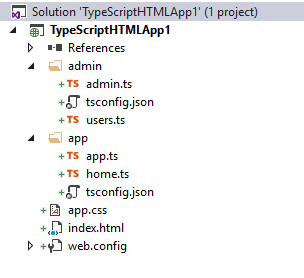
TypeScript 1.8 在所有项目类型中都允许使用 tsconfig.json 文件。包括 ASP.NET v4 项目、控制台应用 和 带 TypeScript 的 Html 应用 项目类型。此外,你不再受限于单个 tsconfig.json 文件,可以添加多个,每个文件都将作为项目的一部分进行构建。这使你能够为应用的不同部分分离配置,而不必使用多个不同的项目。
🌐 TypeScript 1.8 allows tsconfig.json files in all project types.
This includes ASP.NET v4 projects, Console Application, and the Html Application with TypeScript project types.
Further, you are no longer limited to a single tsconfig.json file but can add multiple, and each will be built as part of the project.
This allows you to separate the configuration for different parts of your application without having to use multiple different projects.
当你添加 tsconfig.json 文件时,我们也会禁用项目属性页面。这意味着所有配置更改都必须在 tsconfig.json 文件本身中进行。
🌐 We also disable the project properties page when you add a tsconfig.json file.
This means that all configuration changes have to be made in the tsconfig.json file itself.
一些限制
🌐 A couple of limitations
- 如果你添加一个
tsconfig.json文件,不被认为属于该上下文的 TypeScript 文件将不会被编译。 - Apache Cordova 应用仍然有单个
tsconfig.json文件的限制,该文件必须位于根目录或scripts文件夹中。 - 在大多数项目类型中没有
tsconfig.json的模板。